Our first LinkedIn Lead Forms use case walks you through the steps to automate your lead processing and funnel your leads into a spreadsheet.
In this more detailed example, we take this idea further by connecting to marketing applications instead of a spreadsheet, and including notification of your team in the process.
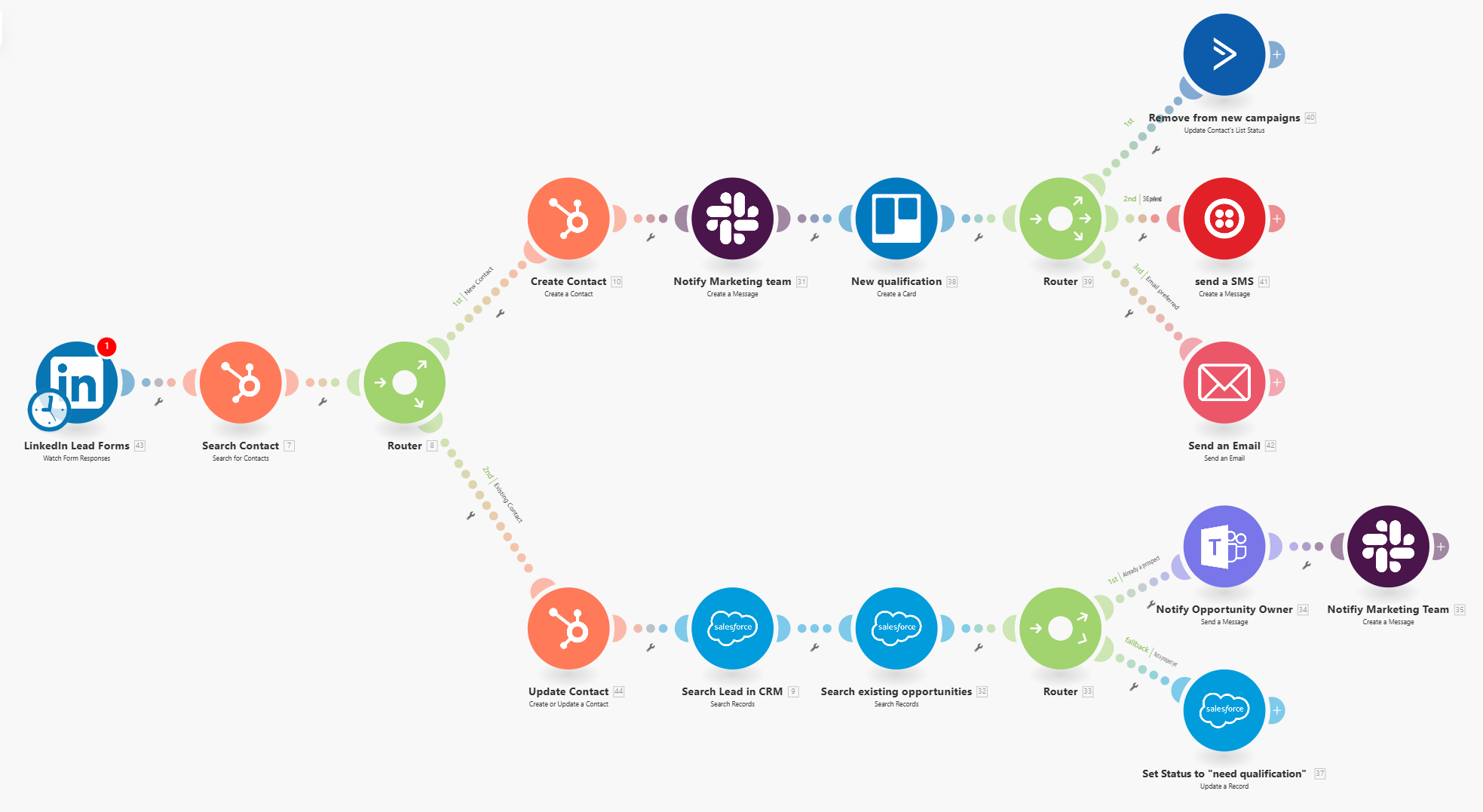
This use case is particularly valuable for companies with a high volume of leads, longer sales cyclesA cycle is the operation and commit/rollback phases of scenario execution. A scenario may have one or more cycles (one is the default)., multiple touchpoints in the customer journey, and a need for close alignment between the marketing and sales teams.
After receiving a response from a completed LinkedIn Lead Form, the scenarioA specific connection between applications in which data can be transferred. Two types of scenarios: active/inactive. is triggered to search for the contact in Hubspot CRM, to check if it already exists. Depending on the result, the scenario splits.
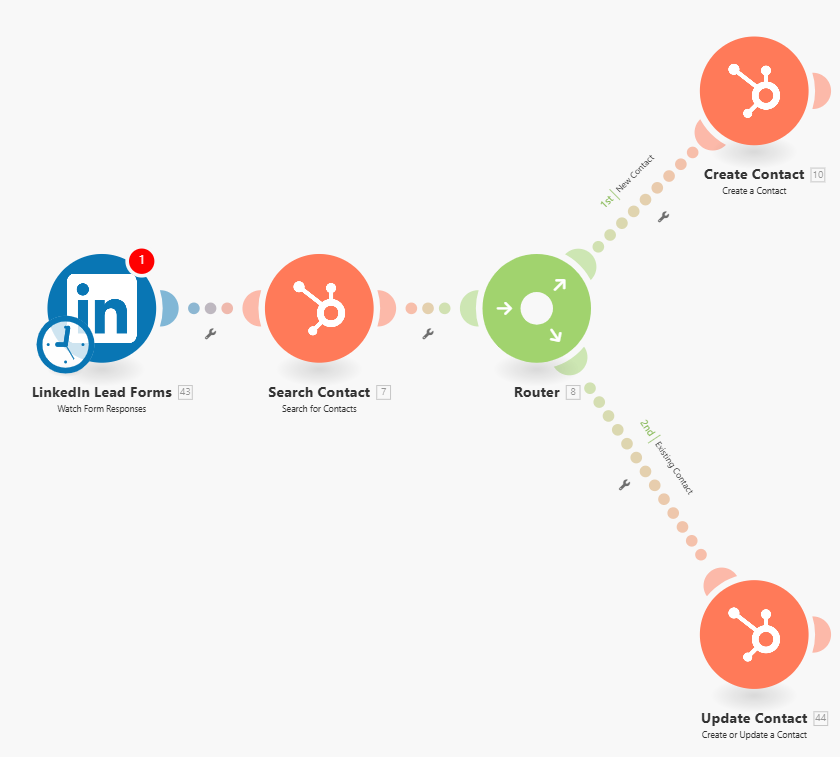
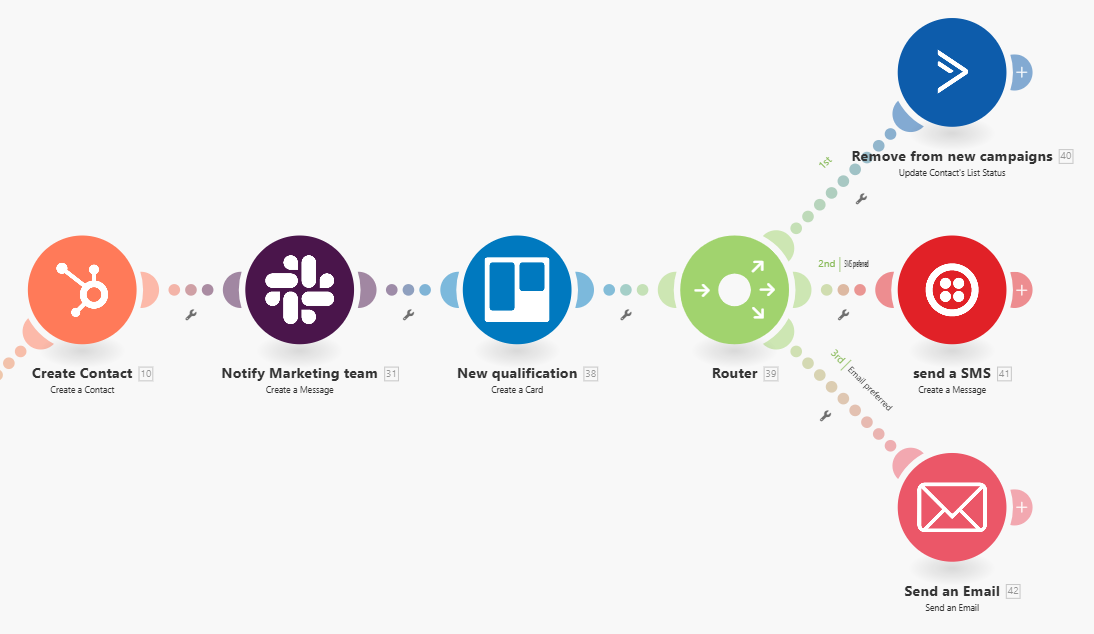
If the contact is new, the next modulesa module is an application or tool designed to handle specific business functions, such as CRM, project management, or inventory. The system's modular architecture allows you to activate only the modules you need, enabling customization and scalability as your business requirements evolve. in the workflow add the contact to Hubspot CRM, and send a message via Slack to the marketing team. This message can be fully customized and sent to an individual or a group chat. Next, a Trello card for a new qualification is created as well. With the new contact captured in multiple applications, they are removed from the existing campaign in ActiveCampaign, to avoid redundant outreach, and then either an SMS or email is sent to the new customer, depending on their indicated preference.
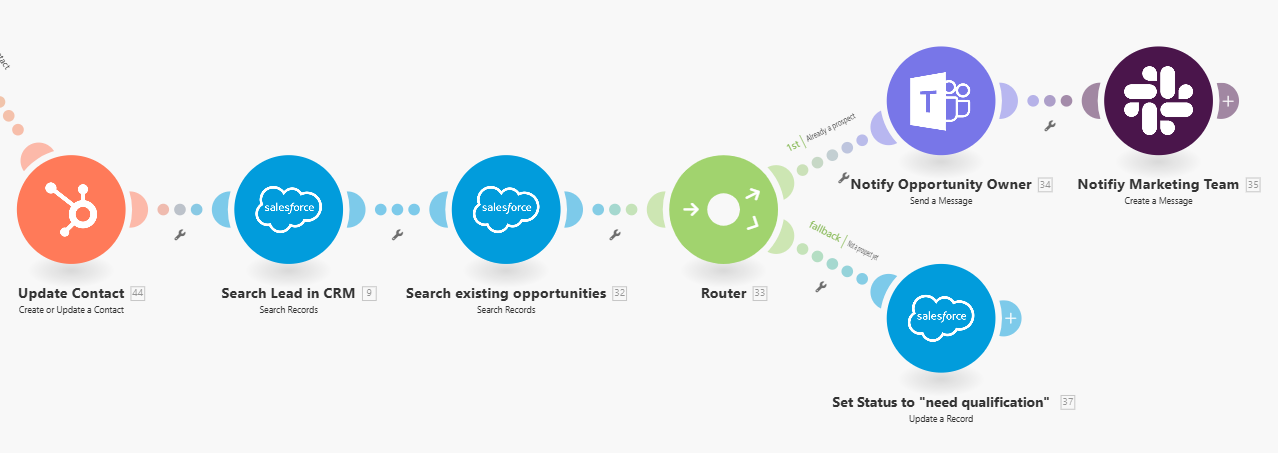
If the contact already exists, the first modulea module is an application or tool designed to handle specific business functions, such as CRM, project management, or inventory. The system's modular architecture allows you to activate only the modules you need, enabling customization and scalability as your business requirements evolve. in this branch of the workflow updates their information in Hubspot CRM,. Then, the next modules search for the lead in Salesforce to see if they are in the CRM and to check if they are part of any existing opportunities. If the contact is already a prospect, the Salesforce opportunity ownerIn Boost.space, an Owner is a role within a space that grants comprehensive control over that space. Owners can manage members, managers, and other owners, view and manage records, edit space settings—including status lists and labels—and have the authority to delete the entire space. is notified in MS Teams and a Slack message is sent to the marketing team. If the contact is not a prospect yet, the statusIn Boost.space, statuses are indicators assigned to records within modules to represent their current state or progress. They can be system-defined, such as "Active" or "Done," or custom-created to fit specific workflows. Statuses help track and manage tasks, projects, and processes efficiently. is set to “needs qualification”.
In this scenario, we’ve chosen to illustrate the lead management process by using a variety of marketing apps, including HubSpot CRM, Trello, and ActiveCampaign, as well as a mix of apps for communicating with your team, to highlight the robust functionality of our platform, spark your creativity, and give you a peek into what is possible.
As you can imagine, you can customize this scenario to include your preferred software with any of the numerous apps we’ve created, shortening or lengthening the process as needed.
There are many benefits to using the flexibility of Boost.spaceA platform that centralizes and synchronizes company data from internal and external sources, offering a suite of modules and addons for project management, CRM, data visualization, and more. Has many features to optimize your workflow! IntegratorPart of the Boost.space system, where you can create your connections and automate your processes. to automate your lead generation process:
- Lead Capture and Management: Efficiently captures and systematically manages leads from digital marketing efforts.
- CRM Integration: Integrates with both marketing and sales CRMs, ensuring data consistency.
- Lead Qualification: Includes a crucial qualification step to focus on promising leads.
- Cross-team Coordination: Notifies both marketing and sales teams, promoting collaboration.
- Automation: Saves time and reduces human errorService is unavailable due to a failure, a service responds with unexpected data or the validation of input data fails. in lead management.
- Multi-channel Communication: Uses various common tools, fitting into existing workflows.
- Lead Nurturing: Includes follow-up communication to maintain engagement.
- Data deduplication: Prevents redundant outreach, improving customer experience.
- Personalization: Uses contact’s preferred communication method for follow-up.
- Campaign Tracking: Helps track the effectiveness of different marketing initiatives.