Discover the Powerful Functions of Boost.space Integrator and Connect to 2300+ Applications
With the IntegratorPart of the Boost.space system, where you can create your connections and automate your processes. you can connect Boost.spaceA platform that centralizes and synchronizes company data from internal and external sources, offering a suite of modules and addons for project management, CRM, data visualization, and more. Has many features to optimize your workflow! with more than 2300+ third-party applications. Some of our modulesa module is an application or tool designed to handle specific business functions, such as CRM, project management, or inventory. The system's modular architecture allows you to activate only the modules you need, enabling customization and scalability as your business requirements evolve./addons can be found in Integrator as well:
NOTE: Keep in mind that the Boost.space modulea module is an application or tool designed to handle specific business functions, such as CRM, project management, or inventory. The system's modular architecture allows you to activate only the modules you need, enabling customization and scalability as your business requirements evolve. must be present in the scenarioA specific connection between applications in which data can be transferred. Two types of scenarios: active/inactive.. More information can be found in this article.
If you haven’t worked in Integrator before, check out the Introduction article, where you’ll find all the necessary information for a basic orientation. You will also need a token and system key to complete the setup. You might find our Connection documentation category useful as well.
These are general functionsFunctions you can use in Boost.space Integrator - create, update, delete, get, search. that you can use for each scenario and Boost.space offers you a specific functionFunctions you can use in Boost.space Integrator - create, update, delete, get, search. called – SYNC request ( = synchronize remote recordIn Boost.space, a record is a single data entry within a module, like a row in a database. For example, a contact in the Contacts module or a task in the Tasks module.) and CUD webhook (create, update, delete).
Each of the above modules has the following functions:
1) Get – this is a request that always gets data from one specific record. Search using a specific ID that specifies a specific request.
2) Update – use this function to edit certain fields of an existing record. Search using a specific ID that specifies a specific request.
3) Delete – a function that allows you to delete an existing record from the system. Search using a specific ID that specifies a specific request.
4) Search – this function will search your system and create a listing of all recordsIn Boost.space, a record is a single data entry within a module, like a row in a database. For example, a contact in the Contacts module or a task in the Tasks module..
5) Create – a function that allows you to create a new field in the system.
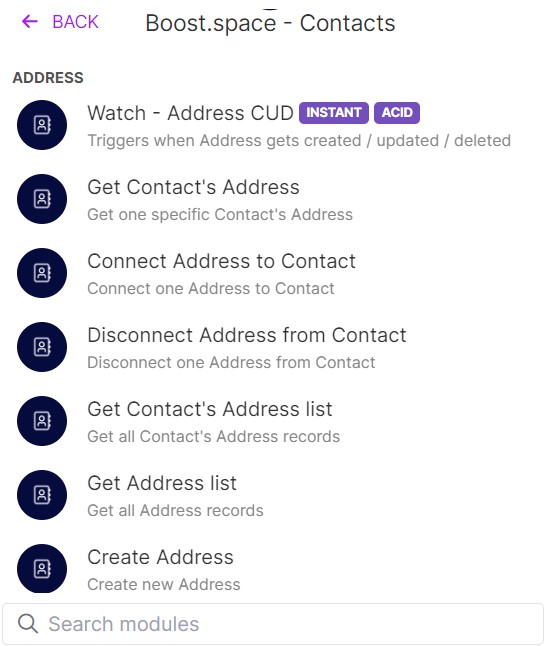
This is an example of how the functions of the Boost.space – Contacts moduleOne of the modules of the Boost.space system. In this module, you can easily manage your business contacts. look like:
If you encounter any problems, please contact our team: [email protected]