Security and trust
Your agents work inside your own system, with exactly the access you give them. Every AgentOS system is a separate, secured environment with its own database. Your data never mixes with another company's, and you decide what each agent may read, change and use.
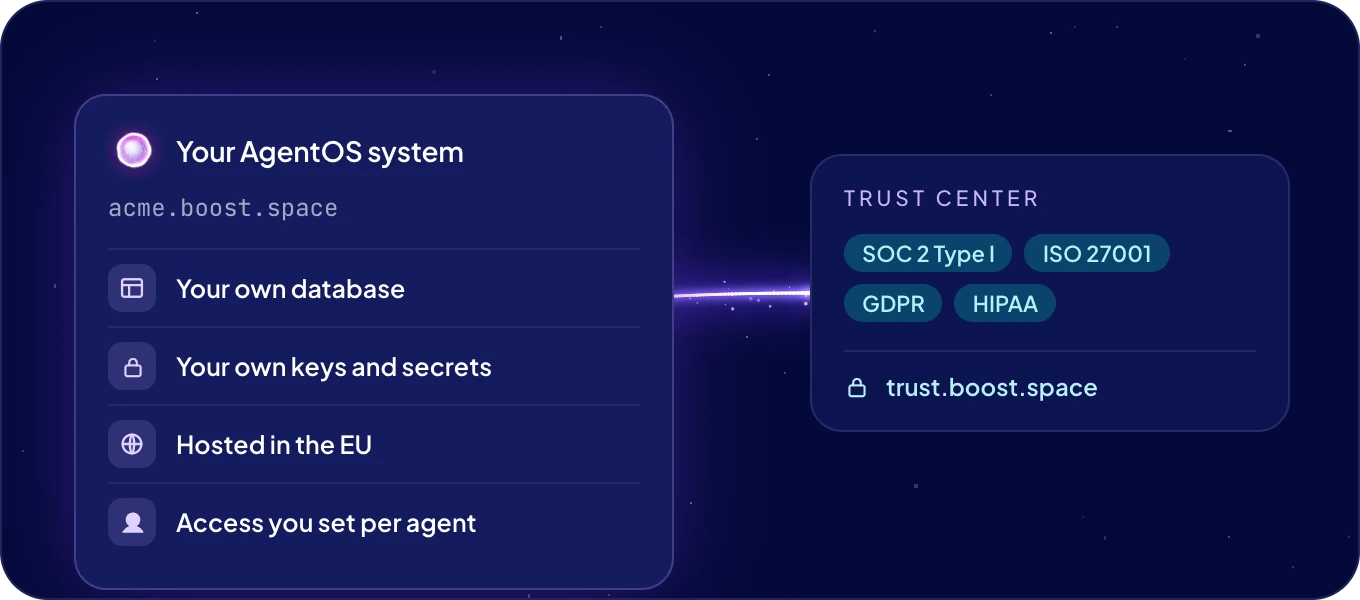
Need our security documents? The Trust Center has our certifications, controls, policies and subprocessors. For a data processing agreement or a security questionnaire, chat with us.
Is my system separate from other customers?
Yes. Your AgentOS system runs separately from every other, on its own address
https://<system name>.boost.space. It has its own database, its own users, its own keys and its
own MCP endpoint. Nothing is shared with another customer's system, and no other customer can
reach your data. Boost.space cloud hosts your system in the EU.
Your agents run on an instance, a server that runs agents. Boost.space cloud runs it for you in the EU and keeps it updated. You can also run agents on a server of your own, so their work stays inside your infrastructure. See Settings.
Which certifications does Boost.space hold?
| Standard | Status |
|---|---|
| SOC 2 Type I | Certified |
| ISO/IEC 27001:2022 | Certified, for the design, development, maintenance, support, sales and marketing of all Boost.space applications |
| GDPR | Compliant |
| HIPAA | Compliant |
| Google CASA Tier 2 | Compliant |
The Trust Center shows each one, the controls behind them and the list of subprocessors. Policies such as access control, encryption, incident management, data retention and business continuity, and documents such as the ISO 27001 Statement of Applicability and a penetration testing confirmation letter, are available there with Request access.
What can an agent see and do?
Only what you allow, agent by agent:
- Your data. For each module you choose No access, Read or Read & write. See Connections and security.
- Your apps. An agent works only in the apps connected for it, with the account you connected.
- Its own key. Every agent is a separate member of your system with its own key. It works with its own access, whoever is talking to it, and takes no seat on your plan. Rotate key retires the old key at once.
- Your decisions. Before an ACT automation reads from another service or goes live, the agent shows you what it is about to do and waits for your yes.
- Your skills. Every skill in the library carries a Security scan result, which you see before an agent learns it. See Skills.
Only admins change an agent's access, and AgentOS asks you to confirm when access widens.
How are automations kept in bounds?
- Only admins and allowed agents build ACT automations. An agent needs Automations set to Allowed. See ACT automations.
- An automation runs with its builder's access. One that an agent built reaches only the data the agent may use. An agent changes only the automations it built itself.
- Every run is isolated. Each run of an ACT automation gets its own environment, which is discarded when the run ends. Runs never share one, and every run is recorded with what it returned. See Runs.
- Removing an agent pauses its ACT automations, and its key stops working at once.
- Webhook addresses are for admins. Only admins see them, and Replace address retires a leaked one at once. AgentOS never stores the credentials a caller sends with a request. See Triggers and webhooks.
How are keys and passwords kept?
As secrets. An agent asks for a key through a one-time link that works once, for 10 minutes. The value goes straight to your system, is stored encrypted, and never appears in the chat or in the code. Nobody can read a secret back, people or agents. See Secrets.
A key for your own AI account stays only in the agent that uses it, on its instance. Boost.space keeps it nowhere else. See Choose your agent's model.
How do I protect people's accounts?
- Two-factor authentication. Each person can require a code from an authenticator app at sign-in. See Your profile and security.
- People you invite. Only the people you invite sign in to your system, each with their own account. Remove someone, and their access ends at once. See Users and teams.
- Tokens with limits. An API or MCP token can do at most what its permissions allow. Delete it from the list as soon as nothing uses it. See API and MCP tokens.
All traffic to AgentOS is encrypted with HTTPS.
Who owns my data?
You do. Export any module whenever you want, see Import and export. Boost.space processes your data only to run your system, under the privacy policy and, when you sign one, a data processing agreement.
Where do I report a security issue?
Write to support@boost.space or chat with us. Live system status is at status.boost.space.
Next: How AgentOS works, or Connections and security.

