Bring AgentOS into your AI
Connect ChatGPT, Claude, Cursor or any other AI tool once. Then, right from its chat, work with your live data, build automations and hand tasks to your agents. Your AI tool connects through the Boost.space MCP server. MCP (Model Context Protocol) is the open standard AI tools use to reach other apps.
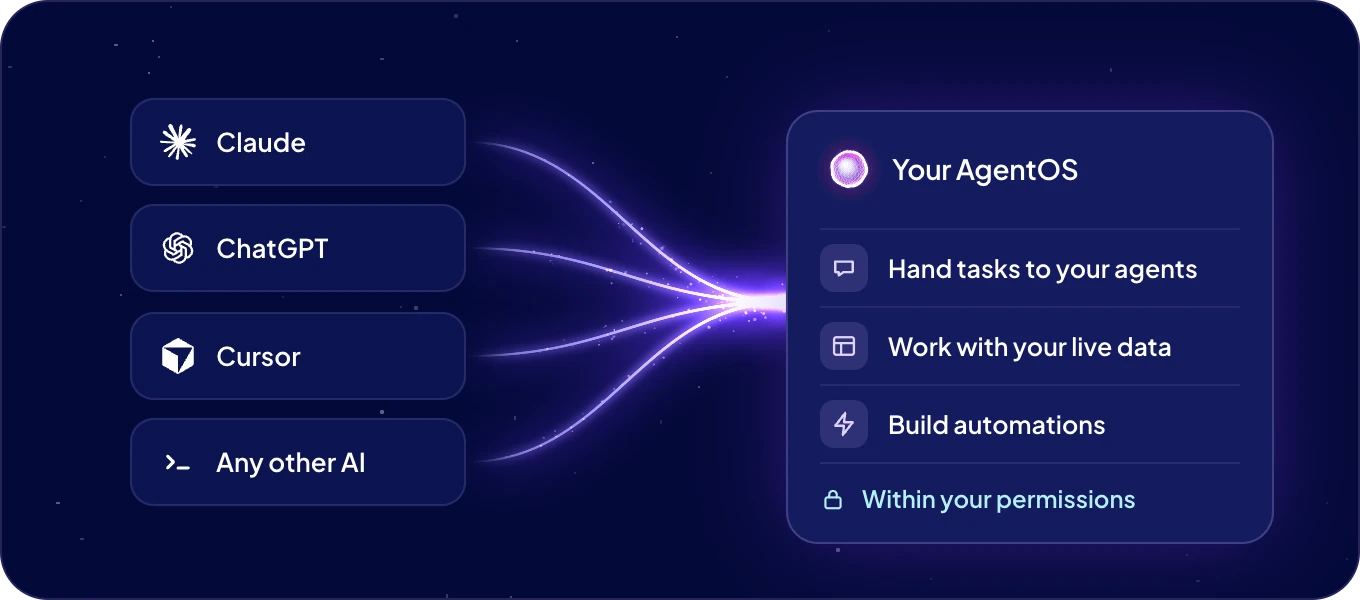
How do I connect my AI tool?
- Click Connections in the left rail, then Connect AI at the top.
- On Bring AgentOS into your AI, click Create token.
- Keep MCP selected. Under Which AI do you want to connect?, pick ChatGPT, Claude, Cursor, v0 or Lovable, or Other... for any other tool.
- Follow the five steps shown for your tool. Under Copy MCP URL, click Copy to take the address of your system.
- Sign in to AgentOS when your tool asks, and approve the access. Then click Continue.
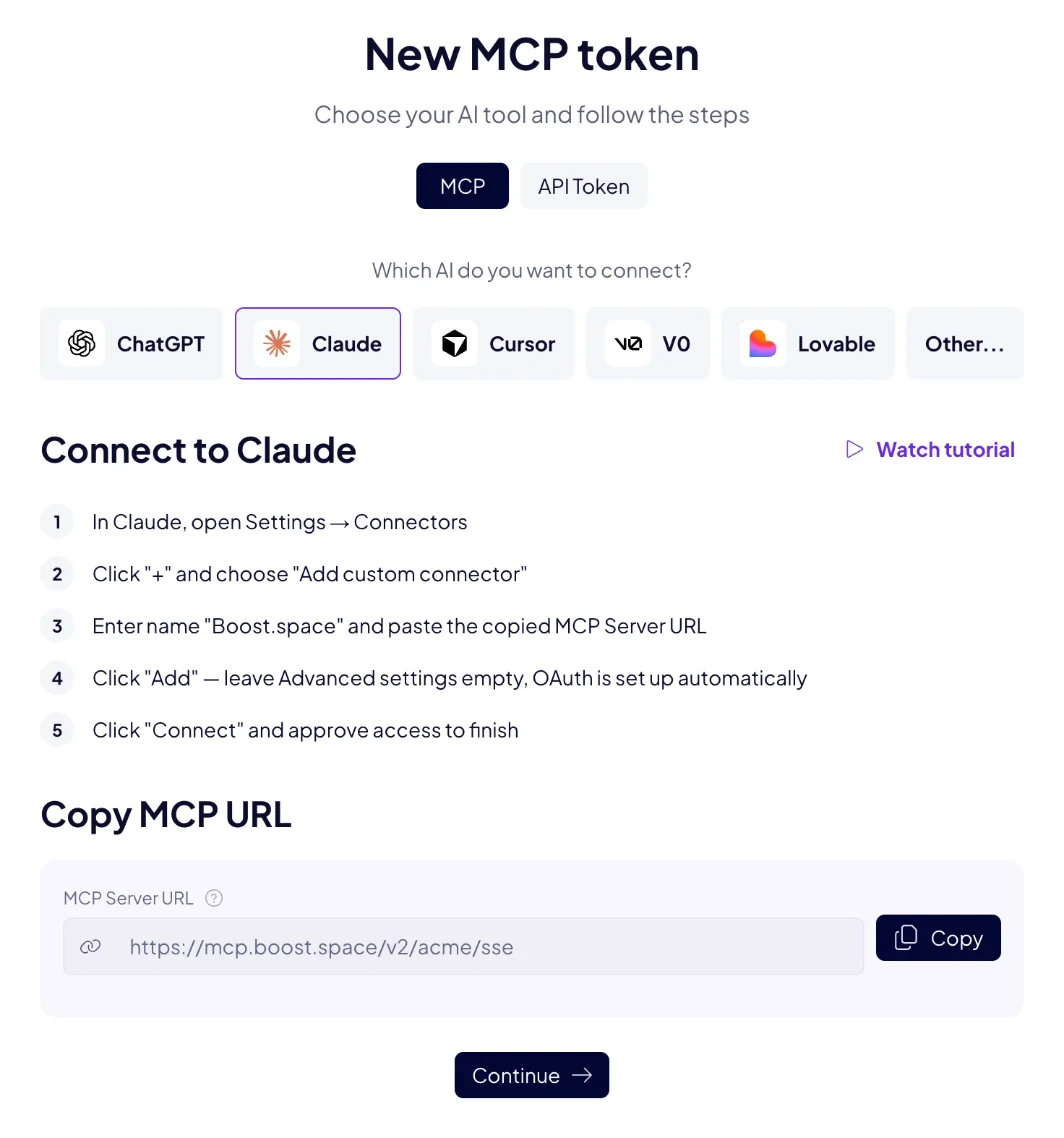
The same window opens from your avatar, under API & MCP tokens > New API/MCP token. Watch tutorial opens your tool's own guide.
ChatGPT, Claude, Cursor, v0 and Lovable sign in with OAuth, so no token is created. Step-by-step instructions for these and other tools, Claude Code and VS Code among them, are in Connect your AI tool.
What can my AI do in AgentOS?
| Area | What your AI can do | Ask, for example |
|---|---|---|
| Records | Find, read and filter records, count and sum them, create, change and delete them. Up to 500 records in one step. Upload and download the files on a record. | "Which of our products have no price yet? List the ten newest." |
| Structure | Create and change modules, fields, field groups, spaces, statuses, labels and menus, and choose the columns a table shows. | "Add a Projects module with an owner, a status and a due date." |
| Search by meaning (coming soon) | Find the records closest to a question, with the vector database. | "Find the tickets where customers complain about delivery." |
| ACT automations | Build an automation from one sentence: it is written, tested and switched on after your yes. Change its triggers and code, run it, read its runs, and ask you for a secret through a one-time link. | "Every Monday at 8:00, e-mail me a summary of new orders." |
| Agents | See your agents and their skills. Hand an agent a task, follow the run, answer its approval and stop it. Schedule agent automations, connect apps, switch skills on or off, and set an agent's access. | "Ask the Support agent to summarize this week's tickets." |
The tools follow your system. They work with all your modules, including the ones you add later, and your AI only sees the tools for what your system has. To see the list, ask your AI: "Which Boost.space AgentOS tools do you have?"
Who can use the agent and automation tools?
Admins. Sign in with OAuth as an admin, or use a token with All permissions that an admin created. The other tools work within the permissions of whoever connected.
When an agent's run waits for an approval, your AI shows you what and why. It approves or rejects only on your word.
Whose access does my AI use?
Yours. Signed in with OAuth, your AI tool can do what you can do in AgentOS, and nothing more. Connected with a token, it can do what the token allows, which is never more than you can.
Your agents work with their own access, set in Connections and security. Your AI tool does not change it.
OAuth or a token: which do I use?
| OAuth | Token | |
|---|---|---|
| How you connect | Paste the MCP URL and sign in to AgentOS. | Create a token, then send it with every request. |
| What it may do | Everything you can do. | What you choose: All permissions, Read only or Custom. |
| Best for | ChatGPT, Claude, Claude Code, Cursor, VS Code, v0, Lovable. | A tool without OAuth sign-in, a script or a server. |
| How it ends | Remove the connector in your AI tool. | Delete the token in API & MCP tokens. |
On sign-in, your AI tool asks for the scopes all (your permissions) and offline_access (to stay
signed in). To create a token, see API and MCP tokens.
What is the MCP server address?
https://mcp.boost.space/v2/<system name>/sse
Replace <system name> with the name in your AgentOS address: for https://acme.boost.space it is
acme. Connect AI shows the address already filled in, under Copy MCP URL.
The same server also answers at https://mcp.boost.space/v2/<system name>/mcp, for tools that
connect over Streamable HTTP. Both addresses offer the same tools and the same sign-in.
Next: Connect your AI tool, step by step for each tool.

