Plans, Tiers & Usage Limits
This article explains how Boost.spaceA platform that centralizes and synchronizes company data from internal and external sources, offering a suite of modules and addons for project management, CRM, data visualization, and more. Has many features to optimize your workflow! plans, Tiers, and usage limits work together.
For a detailed feature comparison, please refer to our pricing page.
Tiers
Each Boost.space plan is combined with a Tier, which is selected based on current requirements.
The selected plan and Tier together define:
- the number of recordsIn Boost.space, a record is a single data entry within a module, like a row in a database. For example, a contact in the Contacts module or a task in the Tasks module. available
- for the Licences +, also the number of operationsOperations are tasks in integration scenarios, similar to "operations" in Make.com. Each action, like reading or updating a record, counts as one operation. They’re essential for data syncing between apps and reset monthly. Going over the limit pauses syncing until you add more or upgrade your plan.
- the number of adminA user role in Boost.space with comprehensive system access, including the ability to add, remove, and manage all system levels. Admins can oversee all users, configure system settings, create custom fields, and manage modules and addons. Admin can also access Integrator and manage automations. usersCan use the system on a limited basis based on the rights assigned by the admin. allowed in the system
Tiers can be adjusted at any time as requirements evolve.
All Plans, Tiers, and their detailed limits are listed on the pricing page.
Free Plan
The Free plan is a free-forever version of Boost.space with limited features and usage. Accounts start with access to the Pro plan for 14 days. If no subscription is purchased, the account continues on the Free plan.
The Free plan includes:
- Access to basic Boost.space functionality
- Limited usage and feature availability
- A limited amount of AI creditsThese credits allow users to access advanced AI functionalities within the Boost.space system.
Pro Plan
The Pro plan extends the Free plan with additional functionality and higher limits.
It includes:
- Access to Pro-level features
- Higher usage limits compared to Free
- AI credits according to the selected plan
Business Plan
The Business plan extends the Pro plan with additional features and higher limits.
It includes:
- Business-level functionality
- Advanced system features
- Higher limits compared to Pro
Enterprise Plan
The Enterprise plan extends the Business plan and includes:
- Enterprise-level functionality and limits
- A Make-based integratorPart of the Boost.space system, where you can create your connections and automate your processes. provided as part of the Boost.space solution
- OperationsOperations are tasks in integration scenarios, similar to "operations" in Make.com. Each action, like reading or updating a record, counts as one operation. They’re essential for data syncing between apps and reset monthly. Going over the limit pauses syncing until you add more or upgrade your plan. included in the Boost.space licenseLicenses to enable access to certain features.
Licences +
The Pro and Business plans are also available in a Licences + variant.
This extended licensing model includes everything from the selected plan plus additional integration capabilities.
With Licences +, you get:
- A Make-based integration engine provided directly as part of the Boost.space solution
- Operations included in the Boost.space license (no separate Make.com billing required)
In this model, integrations run on the embedded Make engine and usage is managed and monitored directly within Boost.space Billing.
Usage, Limits, and Access
Each Boost.space plan is paired with a Tier, which defines the overall usage limits and access within the platform.
Depending on the selected plan and Tier, the following limits apply:
- Records
Define the amount of data stored and processed in Boost.space.
- AI credits
Are used for AI-powered features and are included in all plans in different amounts.
- Administrators
The selected plan and Tier define how many administrators can manage the Boost.space systemA platform that centralizes and synchronizes company data from internal and external sources, offering a suite of modules and addons for project management, CRM, data visualization, and more. Has many features to optimize your workflow!.
- Operations
Apply only when integrations are provided as part of Boost.space:
- For Free, Pro and Business integrations run in a connected Make.com account and operations are managed and billed directly in Make.
- For Licences + and Enterprise operations are included in the selected Tier and usage is visible in the Boost.space Billing section.
Exact limits depend on the selected plan and Tier and are listed on the pricing page.
Managing Usage and Limits
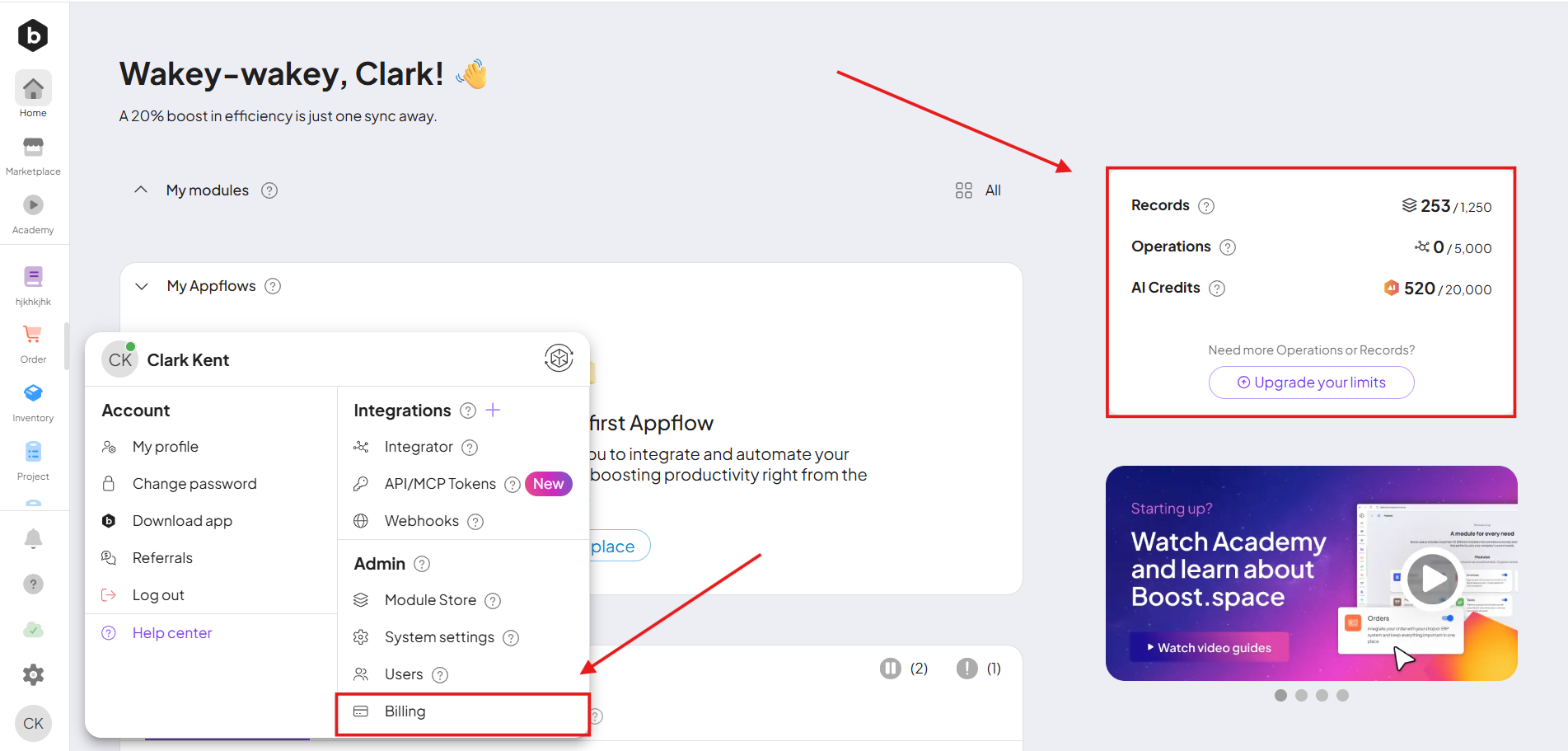
Administrators can view and manage usage at any time in the Billing section.
The Billing section is accessible:
- directly from the Boost.space homepage, or
- via Profile Settings → Billing
From there, administrators can:
- monitor records, AI credits, operations (Enterprise only), and admin limits
- upgrade plans or change Tiers as needed
If you still need to clarify anything, please reach out to us at [email protected].